
Diving into the Steam Web API and SteamSpy
Testing and configuring game data sources for a local analytics platform
Not subscribed yet? Use the button below:
Hi, I’m Luigi. I share my notes, observations, analyses, and what I learned from the masters.
Opinions expressed are solely my own and do not express the views or opinions of my employer.
INTRO
In the previous articles, we designed and built a local, lightweight data platform.
We set up a Dockerized environment with Airflow,

We set up a Dockerized environment with Airflow, and added a frontend layer with Streamlit.

Our brand-new car is ready to hit the road, but we’re still missing two important things:
The fuel.
And the destination.
It’s time to reveal the scope of the project.
We are going to build a data platform that collects and processes Steam game data to analyze the best-performing games over time.
In this metaphor, the fuel is our source data. In this article, we’ll set up and test access to that data directly from our Dockerized environment.
We’ll also take a first look at the raw data itself, to understand what we’ll be working with in the next steps.
API tests from Dockerize environment
To send our test requests to the APIs we will use Jupyter notebooks inside VS Code.
First, install the following VS Code extensions:
Dev Containers
Jupyter
Python
From the airflow-docker folder, run:
docker compose up -dOnce the container is started, attach VS Code to it.
Open the Command Palette in VS Code and type:
>Dev Containers: Attach to Running Container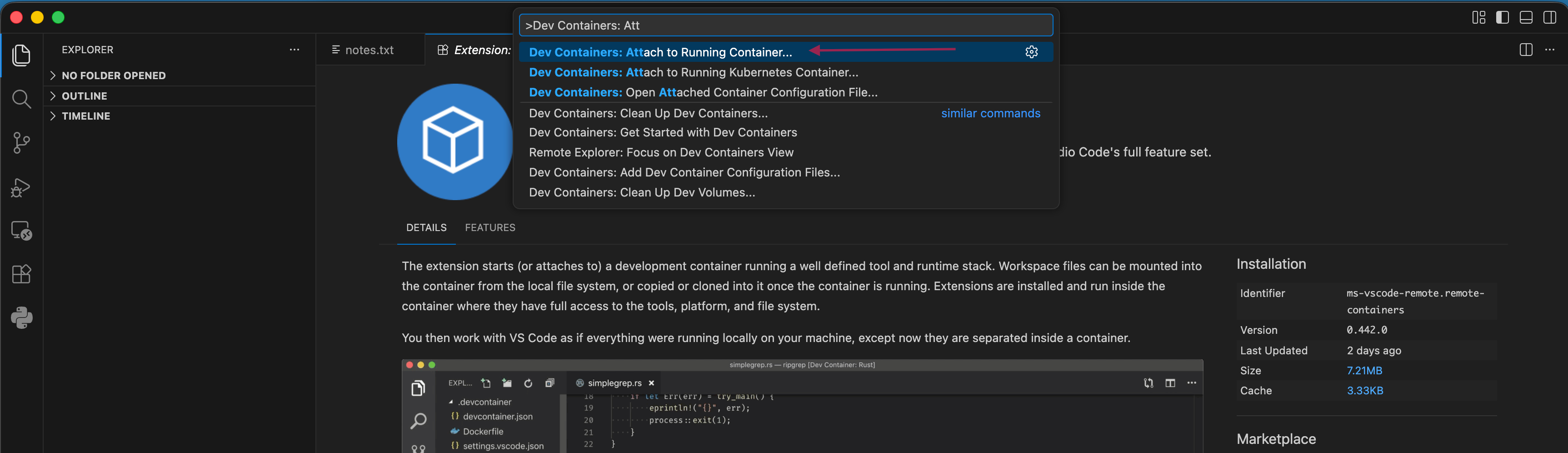
Select it from the list and attach to the running container airflow-scheduler.
This will open a new VS Code window running inside the container.
You can confirm the connection by checking the bottom-left corner of the UI.
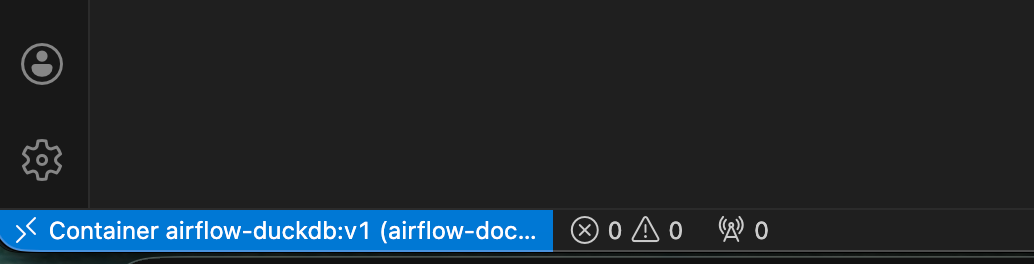
Open a terminal in the VS Code instance running inside the container and install the required packages:
airflow@1c5b483c2a5f:~$ pip install jupyter ipykernel requestsOnce completed, register the current Python environment as a selectable Jupyter kernel:
python -m ipykernel install --user --name airflow --display-name "Airflow (Docker)"Test connectivity to Steam Web API
Now create a Jupyter notebook (e.g., test_api.ipynb) inside the container and run the following test:
import requests

resp = requests.get(
    "https://api.steampowered.com/ISteamUserStats/GetNumberOfCurrentPlayers/v1/",
    params={"appid": 730},
    timeout=10
)

resp.json()
If prompted, select the Airflow (Docker) Python kernel.
If everything works correctly, the API will return the number of current players for the selected game (Counter-Strike 2).
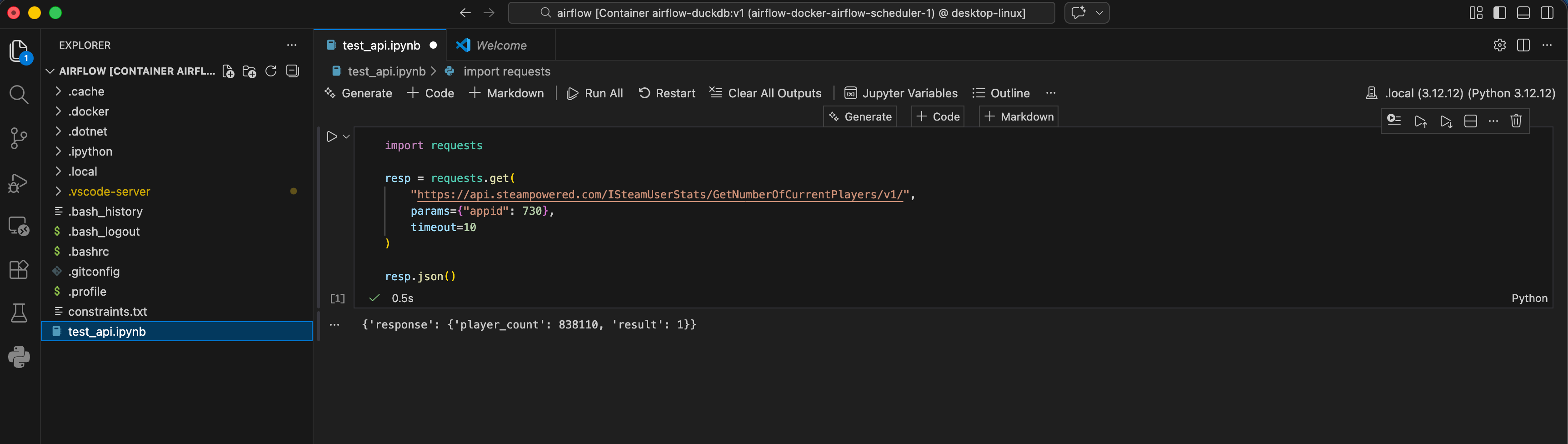
The official Steam API provides public endpoints (like the one above), which do not require to generate an API Key for authentication, and Authenticated endpoints that do require to generate a key on the platform before usage.
Test connectivity to SteamSpy API
We can use a similar approach to test the connectivity to SteamSpy.
Let’s try to retrieve the details for “Counter-Strike 2“.
import requests

resp = requests.get(
    "https://steamspy.com/api.php",
    params={
        "request": "appdetails",
        "appid": 730  # CS2
    },
    timeout=10
)

resp.json()
This returns metadata and aggregated statistics such as:
Estimated owners
Playtime metrics
Recent activity
Genre and tags
Pricing information
{'response': {'player_count': 838110, 'result': 1}}
{'appid': 730,
 'name': 'Counter-Strike: Global Offensive',
 'developer': 'Valve',
 'publisher': 'Valve',
 'score_rank': '',
 'positive': 7642084,
 'negative': 1173003,
 'userscore': 0,
 'owners': '100,000,000 .. 200,000,000',
 'average_forever': 33488,
 'average_2weeks': 773,
 'median_forever': 6560,
 'median_2weeks': 349,
 'price': '0',
 'initialprice': '0',
 'discount': '0',
 'ccu': 1013936,
 'languages': 'English, Czech, Danish, Dutch, Finnish, French, German, Hungarian, Italian, Japanese, Korean, Norwegian, Polish, Portuguese - Portugal, Portuguese - Brazil, Romanian, Russian, Simplified Chinese, Spanish - Spain, Swedish, Thai, Traditional Chinese, Turkish, Bulgarian, Ukrainian, Greek, Spanish - Latin America, Vietnamese, Indonesian',
 'genre': 'Action, Free To Play',
 'tags': {'FPS': 91172,
  'Shooter': 65634,
  'Multiplayer': 62536,
  'Competitive': 53536,
  'Action': 47634,
  'Team-Based': 46549,
  'e-sports': 43682,
  'Tactical': 41468,
  'First-Person': 39540,
  'PvP': 34587,
  'Online Co-Op': 34056,
  'Co-op': 30342,
  'Strategy': 30189,
  'Military': 28762,
  'War': 28060,
  'Difficult': 26037,
  'Trading': 25813,
  'Realistic': 25497,
  'Fast-Paced': 25369,
  'Moddable': 6667}}
Unlike the official Steam API, SteamSpy does not require an API key because it is unofficial and publicly accessible, but it comes with trade-offs: it is subject to rate limits, offers no service-level guarantees, and may change without notice.
Conclusions
We successfully tested the APIs that will provide source data to our platform directly from our Dockerized environment.
In the next article, we will develop an Airflow DAG that retrieves and transforms this data to support our analytics objectives.